

Newsbridge Software
Our unique and easy-to-use Newsbridge™ software, gives you everything you need to record, edit, master, duplicate and publish effortlessly. No prior knowledge of digital recording or computers required!
Just some of the many Newsbridge features are described below, along with screen shots...
-
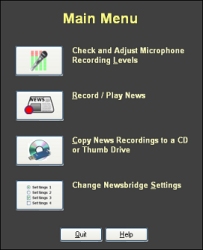
Main Menu
From the Main Menu, recording levels can be checked, news can be recorded, edited or played back, recordings can be duplicated to thumbdrives or CDs and Newsbridge settings changed
-
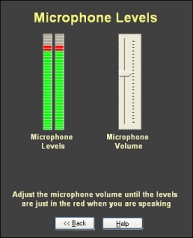
Microphone Levels
Recording levels can be easily checked and adjusted
-
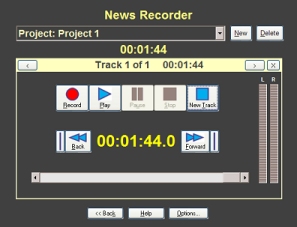
News Recorder
Familiar buttons such as Play, Pause and Record make Newsbridge quick to learn and easy-to-use. As recordings are made, the total project time and individual track time are updated in real time. No pause in the recording process is needed to create a new track, just press the New Track button on screen, or the spacebar on the keyboard.
-
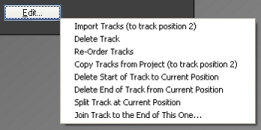
Edit Tracks
With easy and quick one-click editing, tracks can be split, joined, imported, deleted, re-ordered, etc.
-
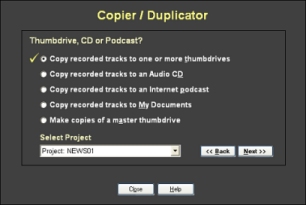
Copier / Duplicator
Newsbridge can create both digital CD masters, thumbdrive masters, or duplicate thumbdrives directly. Just select a project and click the Next button. It's that easy!
-
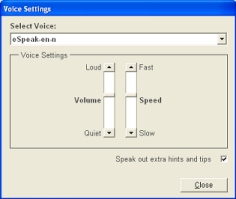
Voice Settings
For visually impaired computer users, Newsbridge™ is available with a self-voicing option. Every part of Newsbridge is accessible through the keyboard and speech feedback.
-
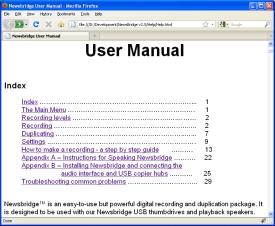
Help
Help is only a button click away! Each Newsbridge screen has its own specific help page, detailing how to use the various features and functions on that particular screen.
Frequently Asked Questions
Where are Newsbridge projects stored normally?
The default location (which can be changed via the Newsbridge Settings screen) is:
- For Windows XP the location is c:\Documents and Settings\YourName\local settings\Application Data\Newsbridge\Projects
- For Windows 7, 8, 10 and 11 it's c:\users\YouName\AppData\Local\Newsbridge\Projects
Newsbridge - Latest Features
As we upgrade and enhance the Newsbridge software, details about the changes we make in each version will be posted here.
Version 5.0.6b - Released 01-Jan-2022
- This is a maintenance release to conincide with the recent release of Windows 11.
Version 5.0.6 - Released 12-Nov-2018
- Newsbridge 5.0.6 includes updates that make activation and moving Newsbridge between PCs much easier.
Version 5.0.4b - Released 29-July-2015
- This is a maintenance release to conincide with the release of Windows 10.
Version 5.0.4 - Released 26-July-2013
- This is a maintenance release to address some issues with running on Windows 8 and to fix some other minor problems.
Version 5.0 - Released 26-April-2012
-
New features have been added to make publishing recordings to the Internet a one click process! These new features work in conjunction with our new webpage tnPlayer.
See above for details about the new publish to Internet features.
Click here to read more about the new webpage tnPlayer™ >> - Volume up! (or Down)! A new editing features allows the volume of a track to be quickly increased or decreased. This is particularly useful when importing music or other tracks into a recording. It's now easy to make all levels uniform.
Version 4.1.6 - Released 08-Nov-2011
- We've enhanced some of the messages that Newsbridge displays when deleting tracks.
- Due to a know 'feature' with Windows, audio files selected for import (using the Edit button) are sometimes imported in a random order. If you experience this problem tick the 'Use Alternative Import Screen' option in Settings. This will force Newsbridge to use a Newsbridge file selector screen, instead of the Windows one. Tracks will then be imported in order.
- Several other minor enhancements.
Version 4.1.3 - Released 21-Jan-2011
- Newsbridge now fully supports the Graff Sapphire-2 USB speakers.
- All tracks and projects are now protected from being accidentally deleted by being placed in the Windows recycle bin, where they can be retrieved if needed.
- For customers duplicating to CD, enhancements have been made to both the CD engine and CD duplication screens.
- A new settings allows the 'are you sure you wish to record over this track' message to be turned on or off.
- Many other minor enhancements.